
How to Compress a Video on Android (No App Install)
To compress a video on Android, open a browser compressor, set a target size (19 MB for Discord, 24 MB for Gmail), and download a smaller MP4. You do not need a Play Store app if the job is simply “make this file fit.”
This guide is the exact tap-by-tap path in Chrome, the size math that keeps you under the cap on the first try, and the Android-specific traps (HEVC gallery files, “share as Drive link,” background kill).
Author: CompressVid Team · Updated 2026-10-08
We build CompressVid, a free online compressor — disclosed bias toward target-size workflows. Method notes at the end; verify current provider limits before a deadline.
Why Android clips feel too big
Phone cameras default to high bitrate HEVC (H.265) or H.264 at 1080p/4K. A one-minute 4K clip is routinely 200–400 MB. Messaging and email caps are not:
| Where it needs to go | Typical limit | Compress to |
|---|---|---|
| Discord (free) | 20 MB (since Aug 2026) | 19 MB |
| Gmail attachment | 25 MB | 24 MB |
| Outlook / work mail | Often 20–25 MB | 19 MB |
| SMS/MMS-style “video message” | Tiny (re-compressed) | Smaller = safer |
If the share sheet only offers Drive / Photos link, the recipient may be blocked at work or school. A real compressed attachment is more portable.
Compress a video on Android in Chrome (5 minutes)
1. Open the compressor
In Chrome, go to compressvid.io. Tap Choose file and pick the clip from Camera, Files, or Photos when Android asks for media access.
2. Pick the target size
Use a quick preset — 19 MB (Discord) or 24 MB (Gmail) — or type the number your portal gave you. The tool derives bitrate from the video’s length so you do not guess CRF values.
Leave ~5% headroom under a hard cap: a “24.0 MB” file can still bounce after container overhead. Our FFmpeg target-size test landed 18.31 MB when aiming at ~19 MB.
3. Wait, then download
Processing runs on the server — your phone is not stuck transcoding for ten minutes. Save the MP4 to Downloads or Photos, then attach or post it.
Need platform-specific detail? See Discord video compressor and compress video for email.
Android-specific pitfalls
HEVC that “won’t open” elsewhere. Many Galaxy/Pixel clips are H.265. Windows players and some web apps still prefer H.264. Choose H.264 output (default in the tool) when the recipient says it will not play.
“Send as Drive link.” Convenient for you, painful for them. Compress under 25 MB and attach the file.
Chrome kills long uploads. For multi-hundred-MB sources, keep the screen on or use a shorter highlight. Our free plan accepts larger files than guests (see pricing on the site) — still, a 60-second clip almost always beats a five-minute squeeze.
SD card / Downloads clutter. Name the output clearly (site-walkthrough-45s-24mb.mp4) so you can find it when the share sheet is ugly.
When not to use the browser
If you will compress the same folder every week (podcast cuts, class recordings), a desktop queue (HandBrake) or an Automator/FFmpeg script beats tapping through Chrome each time. If the clip is 5 seconds and well under the cap already, skip compression entirely.
If you need captions, trim, or B-roll before shrinking the file, edit first in CapCut/InShot/etc., then run the export through a target-size pass so the final file still fits.
Method comparison (Android)
| Method | Exact size? | Install? | Best when |
|---|---|---|---|
| Browser compressor (target MB) | Yes | No | Deadline + hard cap |
| Play Store compressor apps | Varies | Yes | Repeat phone-only jobs |
| Share via Drive link | No | No | Recipient accepts links |
| FFmpeg via Termux | Yes | Advanced | You already script |
We prefer the first row for one-off send failures. Store apps can work — read privacy (on-device vs upload) and export watermarks before trusting a client deliverable.
Quality vs size (same math as desktop)
| Goal | Rough idea |
|---|---|
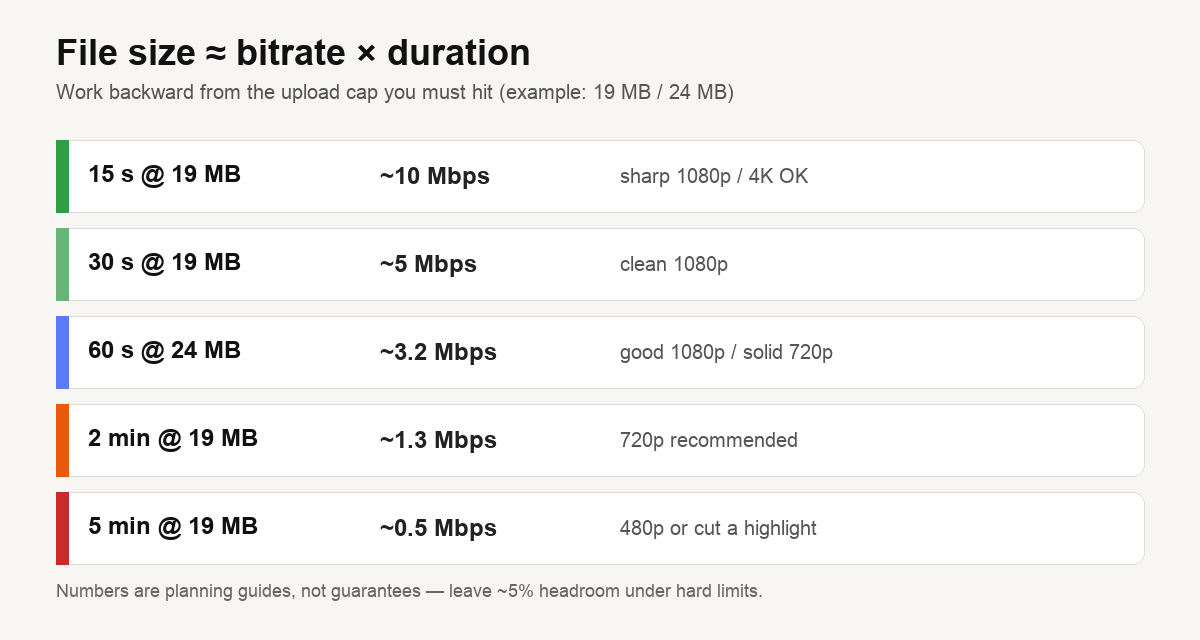
| Sharp 1080p, ~30 s, 19 MB | Easy (~5 Mbps total) |
| 60 s talking head, 24 MB | ~3.2 Mbps — clean |
| 2 min+ at 19 MB | Drop to 720p before you starve bitrate |
Full derivation: compress to an exact file size. Codec primer: video compression basics.
FAQ
Can I compress video on Android without an app?
Yes. Chrome + a browser compressor. You get an MP4 under the size you set.
What size should a video be for WhatsApp or Telegram?
Both allow large files but will re-compress for playback. If it must arrive playable, target under 16 MB or send as a file, not a video note. Limits change — check the app’s current help.
Will it look bad?
Moderate compression is hard to notice on a phone screen. Forcing several minutes of 4K under 20 MB will soften the image — cut a highlight.
Where is the compressed file?
Check Chrome Downloads or the folder you chose. Then attach it from Gmail/Discord as usual.
Sources & method
- Cap examples (Discord 20 MB free after August 2026, Gmail 25 MB) come from public help pages, checked October 2026.
- Browser workflow is how our compressor works on Android Chrome; other web tools follow the same pattern. We did not lab-test every Play Store compressor app.
- Size guidance mirrors our measured FFmpeg encodes (2026-10-07, 30 s 1080p synthetic clip) — relative, not a guarantee for camera footage. See best free video compressors.
- We operate CompressVid. Use HandBrake/FFmpeg if you need offline forensic control.
Related: How to compress a video on iPhone · How to compress a video · Best free video compressors · Compress MOV