
How to Make a GIF from a Video (Small, Clean Loops)
To make a GIF from a video, choose a short segment, reduce its width, set a frame rate, and export the animation. Start with two or three seconds at 320 pixels wide and 10 FPS, then increase detail only if the result needs it. The video-to-GIF tool provides these controls in a browser.
We build CompressVid and have a commercial interest in recommending it. The examples below use our own synthetic footage, actual hosted conversion settings and downloaded output files. We checked the cited format and FFmpeg documentation on October 13, 2026.
Pick a moment that works without sound
A GIF is an image animation with no audio track. Choose a gesture, a UI change or a visual explanation that makes sense without narration. If the message depends on speech or music, keep a video file with sound instead.
Find the start of the action and a natural stopping point. A useful loop might show a button changing state, a single product movement, or one short reaction. Extra lead-in and idle frames add weight without helping the viewer. For a recording with several useful moments, create separate loops rather than one long animation.
A seamless loop needs the final image to connect plausibly with the first. Enabling repetition does not create that connection for you. A progress bar that resets, a camera pan that jumps backward, or a timer returning to an earlier value will still show a visible seam.
Before exporting, decide where the animation will appear. A small chat preview and a slide viewed on a projector need different detail. If readable text forces you to keep a large width, crop the source to the relevant area or consider MP4.
If the source is sideways or mirrored, correct its rotation or flip before selecting the final loop.
How to make a GIF from a video online
1. Upload a copy you are allowed to process
Open the GIF maker and choose your recording. Common extensions include MP4, MOV, WebM and MKV. The extension describes a container; the actual codec and file integrity still determine whether decoding succeeds.
Use your own footage or material you have permission to reuse. Removing sound does not remove copyright obligations. For screen recordings, inspect every selected frame for names, messages and other private details.
The browser preview uses a local object URL, but creating the GIF uploads the video to FreeConvert. A short output selection does not mean only those selected seconds are uploaded: the workflow uploads the source file. Use the local FFmpeg method below when the recording must stay on your device.
2. Set the start and end, then recheck both
The page initially selects up to the first five seconds. Its allowed selection is 0.5–15 seconds, within the source duration. To export the section from two seconds to five seconds, choose Start 2.0 and End 5.0.
Set the start first. In the current interface, changing the start also moves the end to up to 15 seconds later, capped by the source length. Recheck the end after adjusting the start; otherwise you may export more footage than you intended.
The fields use 0.1-second steps. That is a selection control, not a promise of exact frame boundaries for every source. Variable frame rates, timestamps and output frame sampling can affect which images land at the edges.
3. Choose width and frame rate
The current width buttons are 320, 400, 480 and 640 pixels. The FPS buttons are 8, 10, 12, 15 and 20. Width controls the output’s horizontal resolution; height follows the source aspect ratio. It does not crop the picture into a square.
| Preset | Width | Selected FPS | A starting use case |
|---|---|---|---|
| Small | 320 px | 10 | Compact reactions or simple actions |
| Balanced, the default | 400 px | 15 | A little more detail and motion |
| Smooth | 480 px | 20 | Motion that benefits from more frames |
| Quality | 640 px | 20 | Larger display when the file budget allows |
These names are presets, not quality certifications. Small text may remain unreadable at 640 pixels, and a slow-moving scene may look adequate at 10 FPS. Preview the actual output at its intended display size.
If you need a different composition, crop the video first. For a border-preserving change of canvas, see the resize guide. Preparing a source can require another encode, so keep the original and avoid unnecessary intermediate exports.
4. Create, download and test the loop
Press Create GIF, then save the result when processing finishes. The product does not add a watermark. Download promptly: links are temporary, about four hours. Link expiry is separate from provider retention; see the privacy policy.
Open the downloaded GIF in a browser, watch more than one cycle, and check its size in bytes. Some viewers show only a still thumbnail or pause animation until you interact. A document editor can also import the first frame instead of an animated object. Test the actual destination before you send the final file.
What three presets produced in our test
On October 13, 2026, we used the actual CompressVid GIF job builder to convert seconds 2–5 of a ten-second synthetic source. The original was 1920×1080 at 30 fps, with H.264 video and one AAC track. Each test requested indefinite repetition.
| Setting | Measured dimensions | Frames in one cycle | Stored cycle duration | File size |
|---|---|---|---|---|
| 320 px, 10 FPS | 320 × 180 | 30 | 3.000 s | 223,163 bytes |
| 400 px, 15 FPS | 400 × 225 | 45 | 3.000 s | 462,578 bytes |
| 480 px, 20 FPS | 480 × 270 | 60 | 3.000 s | 821,201 bytes |
All three had zero audio streams. Their loop extension was 0, meaning indefinite repetition. The public evidence record contains settings, hashes, frame counts and stored delays, with a link to the input-generation recipe.
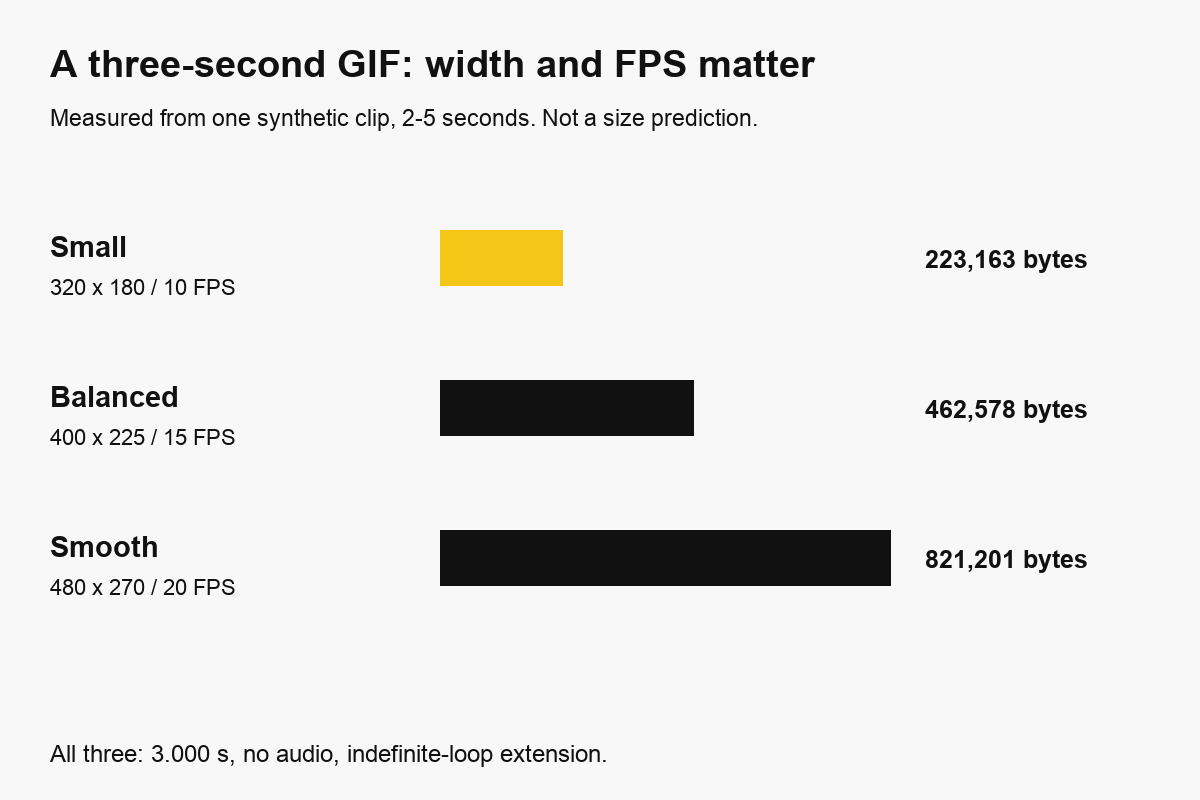
Both width and FPS changed between these tests. The table therefore does not isolate either variable’s individual effect. The synthetic scene has simple color bands plus moving details; its byte counts are not estimates for faces, foliage, games or camera noise.
If you have a strict upload limit, measure your own output. There is no guaranteed target-byte control in this GIF workflow. Reduce one setting, export again and check. Do not assume a smaller video source file automatically creates a smaller GIF.
Why a GIF can be larger than an MP4
GIF stores indexed-color image frames, while modern video codecs can represent motion and repeated visual information efficiently. Width, duration, frame count, changing detail and palette conversion all contribute to the result.
Doubling width at a fixed aspect ratio approximately quadruples pixels per full frame. Doubling duration or FPS increases the number of sampled frames. These are workload relationships, not a formula for final bytes: partial-frame updates, compression and scene content prevent a fixed multiplier.
The MDN image-format guide explains GIF’s indexed-color tables. A table supports up to 256 entries; animations may use different local palettes. Saying the whole animation can contain only 256 colors is too broad.
GIF’s LZW compression is lossless for the indexed image data it receives. Converting full-color video into that palette is not generally lossless. Gradients can become bands or speckles, and small edges can deteriorate after scaling. Dithering simulates intermediate colors with patterns; it does not restore the original full-color pixels.
Keep MP4 when sound, photographic detail, longer duration or efficient delivery matter more than image-style embedding. A destination may transcode a posted GIF to video anyway. Compatibility with GIF in browsers does not guarantee autoplay in every email client, chat setting or document.
Why the FPS label is not enough
GIF frame delays are stored in centiseconds, or 10-millisecond units. A 10 FPS cycle can use 100 ms per frame, and 20 FPS can use 50 ms. A 15 FPS interval is about 66.7 ms, which cannot be written as one exact centisecond value.
Our 15 FPS output contained 45 frames over 3,000 ms, with delays of 60 and 70 ms. That is 15 frames per second over the stored cycle. ffprobe reported 50/3 in its frame-rate field for that same file, so relying on that field alone would give a misleading account of the selected rate.
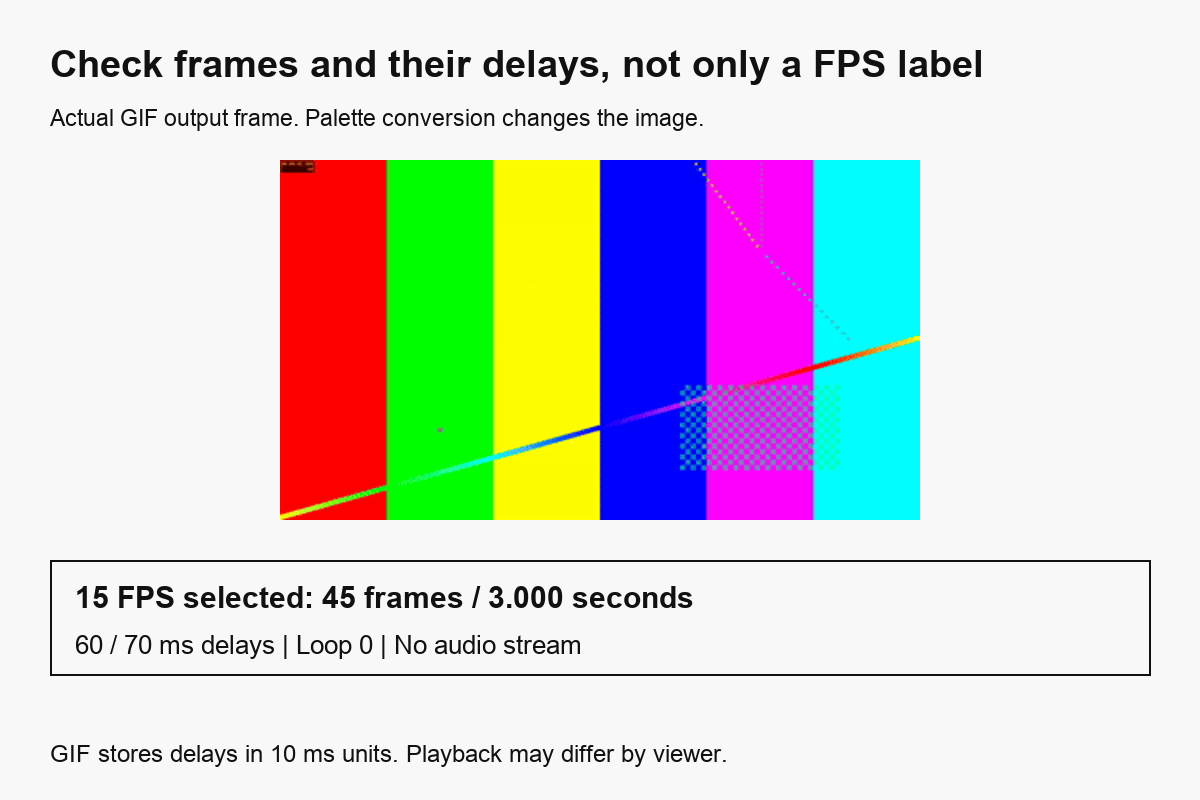
The FFmpeg GIF muxer documentation describes the centisecond time base and loop settings. Playback software can schedule or clamp delays differently, especially under load or with animation preferences enabled. Stored timing and observed screen playback are related checks, not identical measurements.
For a UI demonstration, inspect whether the action remains understandable rather than maximizing FPS automatically. For a repeating reaction, watch the boundary between cycles. More frames do not hide a badly chosen seam.
Make a GIF locally with FFmpeg
This command creates a local three-second GIF starting at two seconds, using a palette generated from the selected material:
ffmpeg -ss 2 -t 3 -i input.mp4 \
  -filter_complex \
  "[0:v]fps=10,scale=320:-1:flags=lanczos,split[a][b];[a]palettegen[p];[b][p]paletteuse" \
  -an -loop 0 output.gif
Here, -t 3 is a duration. It is not an absolute end timestamp. The command selects a section, samples at 10 FPS, scales to 320 pixels wide, builds a palette and uses that palette for the animation. -an excludes audio and -loop 0 requests indefinite repetition.
We ran this command with FFmpeg 8.1.2 on the same synthetic source. The resulting local GIF was 320×180, 30 frames and 3,000 ms per cycle. The hosted provider uses its own conversion pipeline; the local recipe is not a promise of identical bytes or palette choices.
The palettegen and paletteuse documentation describes their options, including dithering. If text remains unclear, crop to the meaningful region or increase width before changing dithering. A larger palette workflow cannot overcome an unreadably small source image.
To inspect frame delays with Python and Pillow:
from PIL import Image

gif = Image.open("output.gif")
loop = gif.info.get("loop")
delays = []
for frame in range(gif.n_frames):
    gif.seek(frame)
    delays.append(gif.info.get("duration", 0))
print(gif.size, gif.n_frames, sum(delays), loop)
The delay sum is in milliseconds. A missing loop extension is different from a stored value of zero. Also open the animation in its intended viewer; inspecting metadata cannot test whether an email client permits animation.
How we tested, and what we did not
We checked MDN’s format guide and FFmpeg’s filter and muxer documentation on October 13, 2026. We ran three hosted presets with one self-generated source, inspected the files with ffprobe and Pillow, and ran the local palette command. The graphs use measured bytes, and the output illustration is an actual decoded GIF frame.
This is a reproducible settings-and-output check, not a matched-quality comparison between GIF and video. We did not test every browser, physical phone, email client or social platform. The API measurements do not independently test product billing. In the product, the credit estimate uses the full source duration and dimensions, not only the short selected GIF segment.
Questions before you export
Can I add sound to a GIF?
GIF has no audio track. Use a video format when you need sound. A platform feature called a “GIF with sound” may deliver video rather than a GIF image file.
Why does my GIF show only one image?
Check whether the file contains multiple frames, then open it in another viewer. Some previews or document imports show a still frame even when the original file is animated.
How do I fit a GIF under an upload limit?
Shorten the segment, reduce width, or reduce FPS, then measure the exported file. If text or motion becomes unclear before you meet the budget, use MP4 or a still image. This tool does not guarantee an exact GIF byte target.
Can this converter make a transparent sticker?
The current controls do not remove a video background. GIF transparency identifies a fully transparent color index rather than partial alpha. Use a workflow designed for background removal and the destination’s sticker requirements.
Should I mute the video before making a GIF?
It is unnecessary for the GIF’s sound because GIF has no audio track. If you instead want a silent MP4 with more detail, follow the mute video guide. To remove dead time before another edit, use the trim tutorial.