
How to Compress a Video on Mac (QuickTime or Browser)
To compress a video on Mac, either use a browser compressor with a target size (best for “must be under 25 MB”) or export a smaller file from QuickTime / iMovie. For upload limits, the browser path is faster and does not require learning export presets.
This guide covers Safari and Chrome on macOS, when QuickTime is enough, how Mac file formats behave (MOV/HEVC from iPhone via AirDrop), and the size math that keeps you under Gmail or Discord caps on the first try.
Author: CompressVid Team · Updated 2026-10-08
We build CompressVid, a free online compressor — disclosed bias toward target-size workflows. Sources and method at the end.
When a Mac video is “too big”
AirDrop and Photos hide the problem until you attach the file:
| Destination | Typical limit | Compress to |
|---|---|---|
| Gmail attachment | 25 MB | 24 MB |
| Outlook / work mail | Often 20–25 MB | 19 MB |
| Discord (free) | 20 MB | 19 MB |
| Job / school portals | Usually 10–100 MB | 5% under the stated cap |
iPhone footage often arrives on your Mac as HEVC MOV — small-ish on disk, still over email caps, and sometimes “won’t open” for the recipient. Targeted compression to H.264 MP4 fixes size and compatibility together. More on MOV: compress MOV.
Option A — Browser compressor (best for a hard size limit)
1. Open the tool
In Safari or Chrome, open compressvid.io. Drag the MOV/MP4 from Finder, or use Choose file.
2. Type the target size
24 MB for Gmail, 19 MB for Discord/Outlook, or the number on your form. The encoder plan is derived from duration — you do not guess CRF.
Leave headroom (~5%). Our FFmpeg test produced 18.31 MB when aiming for ~19 MB on a 30 s clip.
3. Download and attach
You get a compatible MP4. Attach in Mail, post in Discord, upload to the portal. No watermark on free compression.
Option B — QuickTime / iMovie (no website)
QuickTime Player → File → Export As → 1080p or 720p. This reduces resolution and often brings a short clip under 25 MB — but there is no “export as 19 MB” button. You may still overshoot.
iMovie can share a smaller file and lower quality, still without an exact size target. Fine for casual sharing; weak when the form says “max 20 MB.”
Use QuickTime when you already have the app open and the clip is short. Use a target-size tool when the cap is a hard requirement.
Mac-specific notes
HEVC MOV from iPhone. If the recipient is on older Windows or a picky web player, convert while you compress to H.264. See iPhone guide.
Finder Preview / Mail Drop. iCloud Mail Drop is not a substitute for an attachment some employers block. Compress first.
ProRes and screen recordings. Screen recordings on Mac can be huge. Highlight beats torture — one minute at 24 MB looks better than twenty minutes at 15 Mbps→0.5 Mbps mush.
HandBrake on Mac. Excellent for queues and quality (open source). Weighs more than a browser tab; see best free video compressors for the trade-off.
Method comparison (Mac)
| Method | Exact size? | Install? | Best when |
|---|---|---|---|
| Browser compressor (target MB) | Yes | No | Gmail/Discord/portal caps |
| QuickTime export 1080p/720p | No | Built-in | Short clip, soft goal |
| iMovie share | No | Built-in | You already edited there |
| HandBrake / FFmpeg | Yes (advanced) | Yes | Batch / archival quality |
If the form says max 20 MB, only the first (or a careful FFmpeg ABR run) is reliable. QuickTime alone is a guess.
Quality vs size
| Clip length | Target | Looks fine at |
|---|---|---|
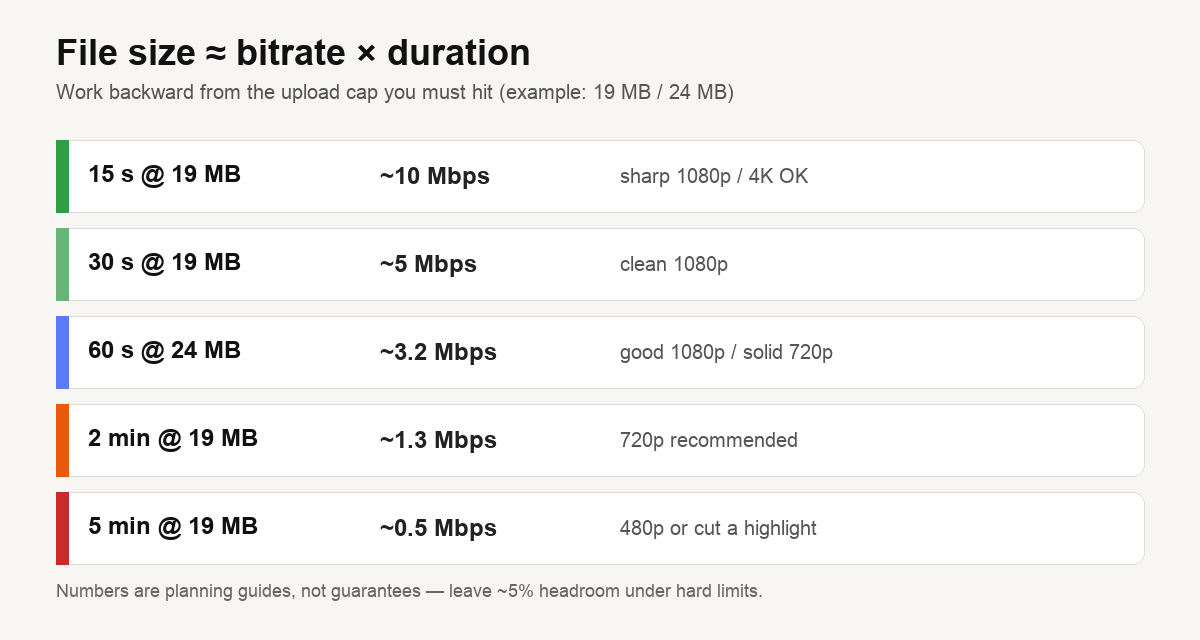
| 30 s | 19 MB | ~5 Mbps — clean 1080p |
| 60 s | 24 MB | ~3.2 Mbps — good 1080p/720p |
| 2 min | 19 MB | ~1.3 Mbps — prefer 720p |
| 5 min | 19 MB | ~0.5 Mbps — cut a highlight |
Math: compress to an exact file size.
FAQ
How do I make a video file smaller on Mac?
Browser compressor with a target size, or QuickTime export to 720p. Only the first guarantees a number.
Does Mac have a built-in video compressor?
QuickTime can export smaller resolutions; iMovie can share lower quality. Neither does “exactly 20 MB” well.
Will compressing ruin my QuickTime recording?
Moderate compression is hard to notice. Extreme squeezes on long 4K will soften the image — reduce resolution first.
Can I compress on Mac without installing anything?
Yes. Safari/Chrome + a web tool. Output is MP4 you can attach immediately.
Sources & method
- Limit examples (Gmail 25 MB, Discord 20 MB free as of Aug 2026) are from public help pages, checked October 2026.
- QuickTime/iMovie behavior reflects standard macOS export UI — they reduce resolution/quality but do not encode to a byte target. Verify on your OS version.
- Encode guidance ties to our measured FFmpeg runs (2026-10-07). We operate CompressVid; we did not benchmark every Mac suite (Final Cut, Adobe) in this note.
Related: How to compress a video on iPhone · How to compress a video on Android · Best free video compressors · Compress MOV
If you are choosing hardware for video work, remember compression is only the export step — capture bitrate on iPhone/Android still dominates file size. See the phone guides and compression basics.